Integrating AI into SaaS as a layer, not a rewrite
Integrating AI into SaaS doesn't mean rebuilding your product. See where the supportive AI layer sits, what it touches, and how to ship it without a rewrite.
 Shahriar P. ShuvoAI for SaaS & Features7 min read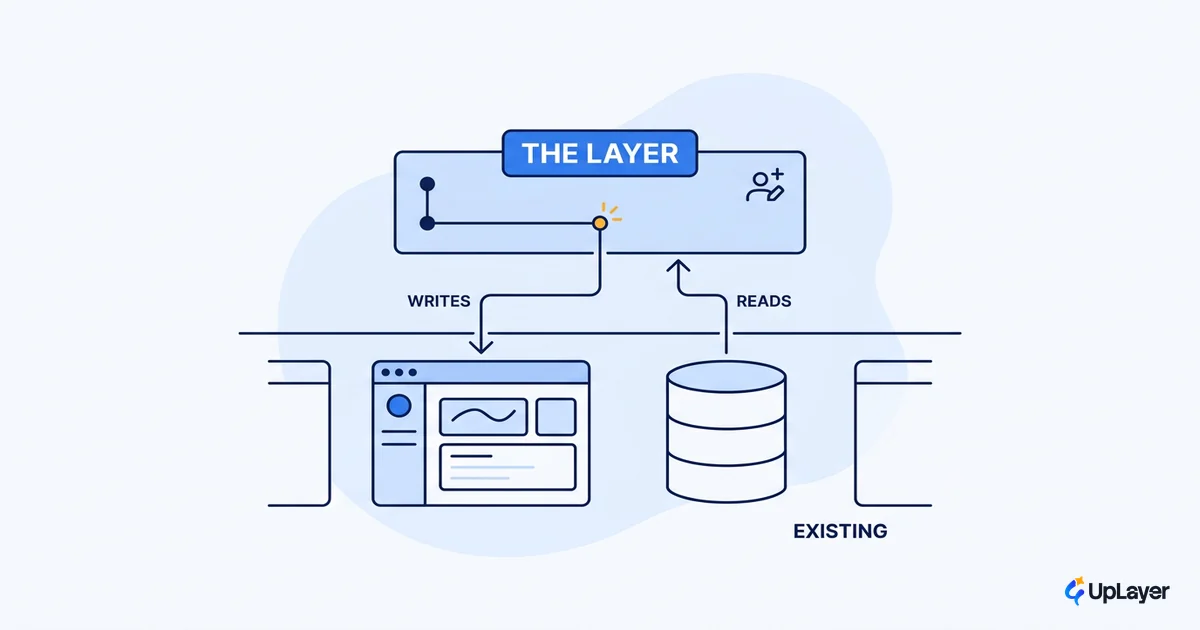
The most expensive mistake in integrating AI into SaaS is believing you have to rebuild the product to do it. You don't. The AI that earns its place in your product is a layer that sits on top of what you already built, reads from systems you already run, and writes back through interfaces you already own.
This matters because the rewrite instinct is what kills the budget and the timeline. It turns a four-week feature into a four-quarter migration, and most of that migration is unnecessary. Adding AI to a SaaS product is an integration problem, not an architecture problem. The complexity lives in the wiring, not in tearing out the engine.
This piece explains where the AI layer sits, what it actually touches, and how to ship in-product AI without betting the company on a model. We build these layers, so the framing here is the one we use on real work, and it ladders up to the bigger question of how to add AI to your SaaS without betting the company.
Do you have to rewrite the product to add AI?
No. In nearly every case, adding AI to a SaaS product means standing up a supportive layer that calls your existing APIs and reads your existing data, not migrating your database or replacing your core logic. The assistant goes on top of the working product. The working product keeps working.
The reason teams reach for the rewrite is a category error. They confuse the vendors who sell foundation models with the job in front of them, which is to put a useful assistant on top of a product that already ships. Menlo Ventures' 2025 enterprise report priced the AI application layer at $19 billion, more than 6% of the entire software market, with coding tools the single largest category at $4.0 billion. The breakout products in that data are layers on top of existing surfaces, not ground-up rebuilds of the tools they assist.
Of the $37 billion enterprises spent on generative AI in 2025, the largest share, $19 billion, went to user-facing products built on top of the models. The money is in the layer.
So the honest answer to "do you have to rewrite the product to add AI" is almost always no. You have to integrate. Those are very different budgets.
Where does the AI layer sit?
The AI layer sits between your user-facing product and your data, as a thin tier that retrieves context, calls a model, and returns a result your existing UI renders. It does not own your data. It reads from where the data already lives and writes back through the same paths your product already uses.
The standard guidance from production retrieval playbooks is explicit: do not move your data, teach the layer to query where it already lives. A retrieval-augmented setup retrieves the right chunks from a vector index over data you already have, so your existing Postgres or MySQL keeps serving structured records through function calls while a vector store handles semantic search over docs and past queries. The model reasons over what the layer retrieves. Nothing about that requires touching your core engine.
Here is the anatomy of the layer and what each part connects to.
| Layer component | Job | Connects to | Do you rebuild it? |
|---|---|---|---|
| Retrieval | Fetch the right context | Your existing DB plus a vector index | No, you add an index |
| Model call | Reason over context | A hosted model API | No, it's a vendor call |
| Guardrails | Enforce the reliability bar | Your eval set and policy rules | No, you author rules |
| Orchestration | Sequence retrieve, reason, act | Your existing service layer | No, you add a service |
| Surface | Render the result in-product | Your existing front end | No, you add a component |
Every row is an addition, not a replacement. That's the whole argument for the layer. You're bolting a capability onto a running system, and the running system keeps running.
What the supportive AI layer should and should not touch
The layer reads broadly and writes narrowly. It can read most of your data to assemble context, but it should write back only through the same validated paths a human action would use. A supportive AI assistant that drafts a reply hands that draft to your existing send endpoint, it does not invent a new one that skips your validation.
IMPORTANT
The model proposes; your existing product logic disposes. When the layer respects the write paths you already trust, a hallucinated output becomes a bad suggestion the user can reject, not a bad action the system commits. Your existing validation is the safety net, which is one more reason the rewrite is unnecessary. You want to keep that validation, not replace it.
This boundary is what keeps supportive AI safe, and it's also the first place we say no. If a proposed feature needs a brand-new write path that bypasses your product's rules, that's not a layer anymore. That's a rewrite wearing a copilot costume.
In-product AI versus a bolted-on chatbot
In-product AI lives inside the workflow the user is already in. A bolted-on chatbot lives in a separate window the user has to remember exists. The first gets used; the second gets ignored. In 2025, more than half of enterprise AI spend went to the application layer rather than raw infrastructure, which tells you where adoption actually happens: inside the tools people already use, not beside them.
The design implication for adding AI to a SaaS product is to place the supportive AI where the decision is made. Summarize the ticket on the ticket. Draft the reply in the reply box. Surface the related records on the record. The layer is technical; the adoption is a design decision about where in-product AI appears. We go deep on that placement question in in-product AI that earns its place on the screen, and on which AI features are worth adding before you wire anything at all.
Integrating AI into SaaS: how do you do it on an existing product?
Integrate in the order that keeps your product shippable the whole time. Each step should leave the product working, so you can stop at any point and still have a release. The order is the reliable part: adding AI to a SaaS product works when you sequence it right, with a metric first and reliability guardrails before features.
- Pick one job and one surface. Choose a single workflow and the exact screen where AI will help. Resist the platform instinct; integrate one thing well first.
- Add retrieval, not migration. Stand up a vector index alongside your existing database. Index the docs and records that job needs. Do not move the source of truth.
- Wire the model call behind a service. Put the model behind your own service so you can swap providers, log every call, and enforce limits. Never call a model directly from the client.
- Author the guardrails. Write the eval set that defines the reliability bar, ground answers in retrieved records, and keep a human in the loop on any action that writes data.
- Render in the existing surface. Add the component to the screen the user already uses. Ship behind a flag, measure against the metric, iterate.
The shape of the integration looks like this, and notice that none of it replaces the product.
user action
  -> existing front end (add one component)
  -> your service        (add one route)
       -> retrieval      (existing DB + new vector index)
       -> model API      (vendor call, logged, rate-limited)
       -> guardrails      (eval set + grounding + human-in-the-loop)
  -> existing write path  (unchanged; the model only proposes)
This is a four-to-six-week shape for a focused feature, not a multi-quarter migration. A supportive layer speeds up an existing workflow without rebuilding it: in GitHub's controlled study, developers with Copilot riding on top of their normal editor completed the same task 55% faster than the group without it. The editor didn't change. The layer did the work.
The discipline is to keep the scope to one job and one surface, which is also how you avoid spending the budget on a feature that moves nothing. For how to choose that first job, see how to rank the opportunities by projected ROI before a line of code gets written.
Integrating AI into SaaS is a layer, not a rewrite. The supportive tier sits on top of your product, reads from systems you already run, and writes back through paths you already trust, so in-product AI becomes a four-to-six-week feature instead of a company-betting migration. The teams that ship are the ones who scope to one job and one surface, then let the existing product keep doing everything it already does well.
TIP
Want a map of exactly where the layer sits in your product, which job to wire first, and the projected return on that feature? How the AX Audit works. In 14 days you get an AI Opportunity Map, a reliability and data-readiness review, and a working concept demo of your top opportunity built as a layer on your product. Our 3X Guarantee: we find AI worth at least three times the fee, or it's free.