Will AI replace UX designers, or reshape the job?
Will AI replace UX designers? A calm answer from a team that ships AI features: which UX work AI absorbs, which it can't, and where the budget earns ROI.
 Anamoul RoufAI Product & UX Design7 min read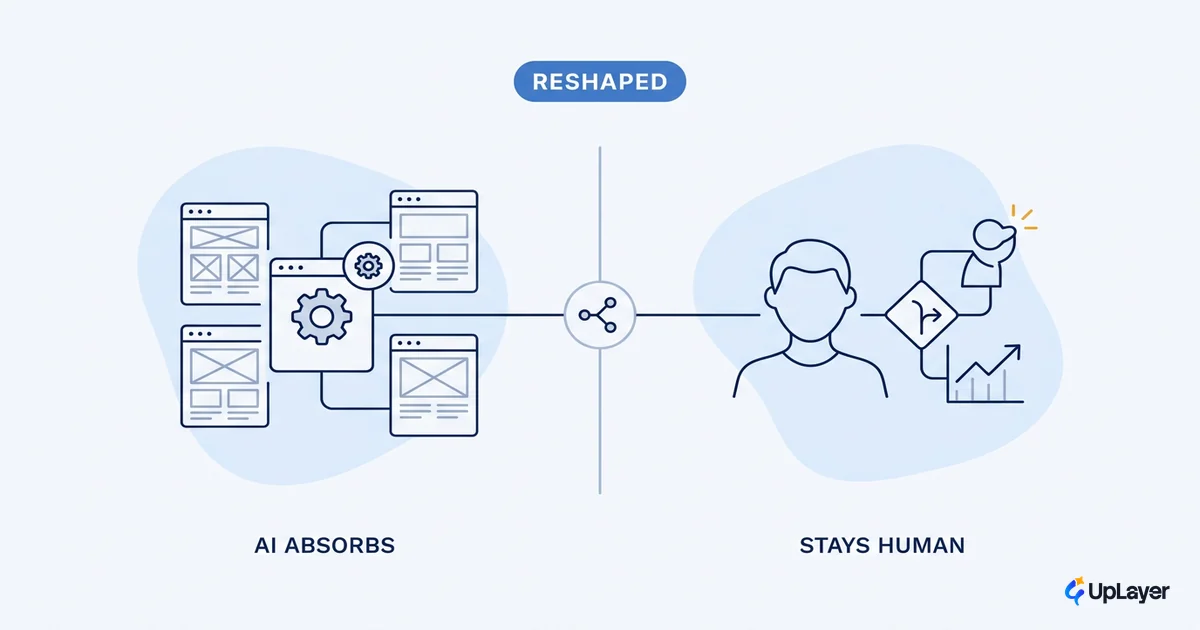
No, AI will not replace UX designers. It reshapes the job, and the reshaping is uneven. Some UX work is already being absorbed by tools. Other parts are nowhere close, and may never be. The honest answer to "will AI replace UX designers" is that the question is too coarse to be useful. Ask a sharper one: which UX tasks does AI take, which does it leave, and where should a product team spend the hours AI frees up?
We build AI features for a living, so we watch this from the inside. The pattern is consistent. AI is good at producing volume and variations fast. It is poor at deciding what is worth producing in the first place. That gap is the whole story, and it maps directly onto which work survives. It also maps onto the UX patterns that make an AI feature get adopted instead of ignored, because the same human judgment that survives automation is what makes a feature land.
Will AI replace UX designers? The short answer is no
UX tools have always changed. Stopwatches gave way to analytics. In-person labs gave way to remote testing. Each shift moved a task off the human and onto a tool, and the job adapted around it. AI is the next shift, larger and faster, but the same shape.
The reason it does not end the role is mechanical. A model can generate a hundred screen variations, but it cannot tell you which one solves your user's actual problem, because it does not know your user or your business. Nielsen Norman Group, after twenty years of UX research, lands in the same place: AI is a new tool, not a replacement, and even when it does more of the work, someone will still need to guide it. Defining the problem, asking the right questions, and judging the output stay human. Those are not tasks. They are the job.
So the fear baked into "will AI replace UX designers" is aimed at the wrong target. The task list shrinks. The judgment expands.
What UX work AI actually absorbs
Be specific about what AI is taking, because the answer is narrower than the headlines suggest. The work AI absorbs well is the commodity layer: high-volume, pattern-based, low-stakes-per-instance.
| UX task | How AI helps | What still needs a human |
|---|---|---|
| Layout and component variations | Generates options in seconds | Picking the one that fits the user's job |
| First-draft microcopy | Drafts labels, empty states, errors | Voice, accuracy, edge-case judgment |
| Repetitive states (loading, empty, error) | Fills in the obvious patterns | Deciding which states even matter |
| Session and interview transcription | Fast, accurate, cheap | Reading what the words actually mean |
| Pattern suggestions during design | Surfaces conventions | Knowing when to break them |
Notice the column on the right never empties. That is the tell. The current generation of AI tools for UX design genuinely help at the margins and stall at the center. Nielsen Norman Group's tool evaluations are blunt about it: in their expert review, existing tools advertised for design were lacking, often a solution in search of a problem. Their later update found things improving, but the tools designers actually adopt are narrow, focused on one repetitive task, not whole-design generators.
Read that as good news. The commodity layer getting automated is the layer designers complain about anyway.
What part of UX work will AI not take
The work AI cannot take is the work that requires knowing something it has no access to: your real users, your business constraints, and the cost of being wrong.
Real-user research is the clearest case. A model can summarize an interview it is handed, but it cannot be the user. As Nielsen Norman Group puts it, AI-generated information cannot yet replace real data from real people, because your customers control their own behavior and their own wallets, and a model only knows what it was trained on. Synthetic users tell you what is plausible. Real users tell you what is true. That gap is exactly why AI UX research on AI features stays a human job: someone has to sample the real output range and watch real people react to the bad answers, not just the curated good one.
Three other categories stay human for the same reason:
- Problem framing. Deciding what to design before anything gets designed. AI optimizes inside a frame; it does not choose the frame.
- Trade-off judgment. Speed versus clarity, automation versus control, what to ship versus what to cut. These are value calls, not pattern calls.
- Accountability. When a feature ships and damages trust, a person owns that. A model cannot be on the hook.
A simple rule keeps the line clear. Hand a task to AI only when a wrong answer is cheap and easy to catch.
hand_to_ai(task) when:
  reversibility == high          # a wrong output is easy to undo
  AND review_cost  == low        # a human can spot the error fast
  AND stakes_per_instance == low # one bad result does not break trust

keep_human(task) when:
  the task defines the problem,
  judges a trade-off,
  or carries accountability for being wrong
Run any UX task through that filter and the split between "absorb" and "keep" stops being a debate. It becomes a checklist.
The AI UX designer is a different role, not a smaller one
The role does not shrink. It moves up the value chain. An AI UX designer spends less time pushing pixels into variations and more time deciding which variation earns its place, then orchestrating the AI that produces the rest. That is more judgment per hour, not less work.
This is why "AI UX designer" reads as a new title rather than a downgrade. The center of gravity shifts from production to discernment, from making options to choosing among them and shaping the AI features themselves. If you want the full picture of what the AI UX designer role actually owns, the short version is this: the same person who used to draw the screens now also decides which AI behaviors belong in the product, and judges whether they hold up in front of real users. That is harder work, and it is worth more.
Good AI product design follows the same logic. The valuable move is not adding a model to a screen. It is deciding which supportive AI behavior moves a metric, and designing it so a person stays in control.
What this means for your product budget
Here is the part the reassurance articles skip. If AI frees up designer hours, those hours only pay off if they go somewhere that moves a number. Freed time spent generating more features you never validate is not a saving. It is faster waste.
WARNING
Most AI features ship and move nothing. They demo well, get a launch post, and never touch churn, activation, or conversion. The cause is almost never the model. It is that nobody decided which metric the feature was supposed to move before building it.
This is exactly the judgment AI cannot do for you, and exactly where the hours it frees should go. Before you redirect a designer's freed time toward shipping more AI, measure the ROI of an AI feature against a metric you already track. Name the metric. Record the baseline. Then build only what projects a real lift.
When AI absorbs the commodity layer, scarce human judgment becomes the bottleneck and the asset at once. Spend it on deciding what to build, not on building more.
That is the discipline behind how we work. Our 3X Guarantee means an audit finds AI worth three times its fee or it is free, and our Ship-It Guarantee means we build until the feature is live and working. Both depend on the same human judgment that automation cannot touch: deciding, before a line of UI exists, which AI feature is worth shipping at all.
The designers who thrive will not be the ones who fight the tools. They will be the ones who let AI take the commodity work and spend the reclaimed hours deciding what earns its place in the product. Will AI replace UX designers? No. It raises the price of judgment, and judgment is the part of the job that was always worth paying for.
TIP
Want to know which AI feature in your product would actually move a metric, before you spend a sprint on it? How the AX Audit works.